Versions
Versions this documentation is relevant for:
- 8.7.0+
List
The Skill – List API call reads existing Users from Eyelit MES. The data can be filtered based on the parameters passed in the body of the JSON packet giving the flexibility to search for one or multiple Users.
Using the Skill – List API call has no impact on the data within the given Eyelit MES application, it is read-only.
Figure 1 - Logic within SKill-List API Call

Data Prerequisites
There is no data required in Eyelit MES to act as a pre-requisite to make the API call to list Skill, although to be able to call the Public API, a Skill must exist in the given Eyelit MES environment. It is, therefore, not possible to receive an empty payload in response when calling this endpoint.
Request
Table 1 shows the method and endpoint required to make the API call to list Users.
Table 1 - Outbound Message Detail for Skill - List
Method | URL Structure | Endpoint |
POST | https://[environment].mestec.net | /api/Skill/List |
The body of the payload should follow the format below:

See Table 2 for information on which fields are optional, the appropriate data types and the mappings to fields in Eyelit MES.
Table 2 - Parameter Information for Skill- List1
Parameter Name | Data Mapping | Data Type | Mandatory | Case Sensitive | Match Type |
ID | skill.id | NUMBER | No | N/A | Exact |
name | Skill.name | VARCHAR2(50 BYTE) | No | No | Exact |
isActive | Skill.isActive | Number | No | No | Exact |
Sample Request
See below for sample use cases with examples of the JSON payload format required.
To list Skill where the skill is equal to ‘QA test:

Response
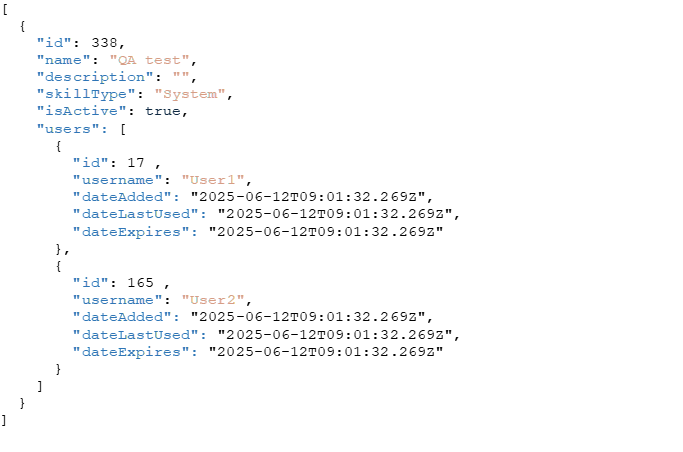
When using the Skill – List API call, if any data has been found in Eyelit MES that meets the parameter values passed in the original payload, a JSON payload will be returned containing data in the following structure:

Sample Response
See below for sample use cases with examples of the JSON payload format returned.
No results were found that matched given parameters:

skill found that matched given parameters:
 Assign
The Skill – Assign API call attempts to assign a User to a skill. Figure 2 shows the logic used within the skill – Assign API call.
Figure 2 - Logic within Skill-Assign API Call

Prerequisites
When assigning a User to a Skill, both the User and Skill must exist in Eyelit MES.
Request
Table 3 shows the method and endpoint required to make the API call to assign a User to a Skill.
Table 3 - Outbound Message Detail for Skill– Assign
Method | URL Structure | Endpoint |
PUT | https://[environment].mestec.net | /api/Skill/Assign |
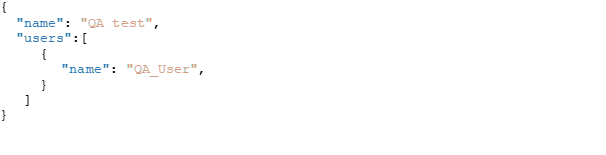
The body of the payload should follow the format displayed below:

See Table 4 for information on which fields are optional, the appropriate data types and the mappings to fields in Eyelit MES.
Table 4 - Parameter Information for Skill – Assign
Parameter Name | Data Mapping | Data Type | Mandatory | Case Sensitive | Match Type |
name | Skill.name | VARCHAR2(50) | Yes | No | Exact |
User |
| JSON Array |
|
|
|
id | useraccount.id | Number | No | No | Exact |
username | Useraccount.username | VARCHAR2(50) | Yes | No | Exact |
dateAdded | User_skill.dateAdded | TIMESTAMP(6) | No | N/A | N/A |
dateLastUsed | User_skill.dateLastUsed | TIMESTAMP(6) | No | N/A |
|
dateExpires | User_skill.dateExpires | TIMESTAMP(6) | No | N/A |
|
Sample Request
See below for a sample use case to assign a User to a skill. The sample provides an example of the JSON payload format required.
 Response
When using the Skill – Assign API call, if the User has been successfully assigned to the Skill, a JSON payload will be returned containing data in the following structure:

Sample Response
See below for sample use cases with examples of the JSON payload format returned.

Unassign
The Skill– Unassign API call attempts to unassign a User from a Skill. Figure 3 shows the logic used within the Skill - Unassign API call.
Figure 3 - Logic within Skill-Unassign API Call

Prerequisites
When unassigning a User from a Skill, both the User and Skill must exist in Eyelit MES, and the given User should already be assigned to the Skill.
Request
Table 5 shows the method and endpoint required to make the API call to unassign a User from a Skill.
Table 5 - Outbound Message Detail for Skill– Unassign
Method | URL Structure | Endpoint |
PUT | https://[environment].mestec.net | /api/Skill/Unassign |
The body of the payload should follow the format displayed below:

See Table 6 for information on which fields are optional, the appropriate data types and the mappings to fields in Eyelit MES.
Table 6 - Parameter Information for Skill – Unassign
Parameter Name | Data Mapping | Data Type | Mandatory | Case Sensitive | Match Type |
name | Skill.name | VARCHAR2(50) | Yes | No | Exact |
User |
| JSON Array |
|
|
|
id | useraccount.id | Number | No | No | Exact |
username | Useraccount.username | VARCHAR2(50) | Yes | No | Exact |
dateAdded | User_skill.dateAdded | TIMESTAMP(6) | No | N/A | N/A |
dateLastUsed | User_skill.dateLastUsed | TIMESTAMP(6) | No | N/A |
|
dateExpires | User_skill.dateExpires | TIMESTAMP(6) | No | N/A |
|
Sample Request
See below for a sample use case to unassign a User from a Skill. The sample provides an example of the JSON payload format required.

Response
When using the Skill – Unassign API call, if the User has been successfully unassigned from the Skill, a JSON payload will be returned containing data in the following structure:

Sample Response
See below for sample use cases with examples of the JSON payload format returned.

